Speed Up Django Tests with setUpTestData
Series Part 5 of 11 in Nifty Django Features
Full disclosure, I stole this feature from Adam Johnson. I learned it while reading “Speed up your Django Tests”, which I can’t recommend enough. So go buy it!
This feature is using Django’s setUpTestData() method. This method is called once per test class. By creating your test data here rather than in setUp, you reduce the number of create and destroy data operations.
Let’s look at some code.
from django.test import TestCase
from myapp.models import Pet, Species

class PetFuzzinessTests(TestCase):
    @classmethod
    def setUpTestData(cls):
        cls.dog = Species.objects.create(name="Dog")

    def setUp(self):
        self.spot = Pet.objects.create(name="Spot", species=self.dog)

    def test_get_fuzzy(self):
        lady = Pet.objects.create(name="Lady Macbark", species=self.dog)
        self.assertLessThan(self.spot.get_fuzzy(), lady.get_fuzzy())

    def test_boop_factor(self):
        lady = Pet.objects.create(name="Lady Macbark", species=self.dog)
        self.assertEqual(self.spot.boopiness(), lady.boopiness())
If we run both tests for PetFuzzinessTests, the lady instances will be created and destroyed twice. Once in each individual test method. The spot instance will also be created and destroyed twice. This is because setUp is called once for each test and there are two tests.1
However, the dog instance will only be created and destroyed once. This is because setUpTestData is called just once regardless of how many test methods are on the class.
So if you find your tests are running a bit slow, consider using setupTestData to speed them up.
More on Django’s TestCase
When I first wrote this (and presented at PyOhio on it), I had an incomplete understanding of how TestCase worked2. I imagined there were actual create and destroy operations occurring. Sort of. It was fuzzy.
How it really works is by using database transactions and savepoints3. When a test in a test case runs, it generally follows this flow:
TestCase.setUpClass()creates a transaction viatransaction.atomic()TestCase.setUpTestData()creates some dataTestCase._pre_setup()creates a savepoint via a now nestedtransaction.atomic()TestCase.setUp()creates more dataTestCase.test_boop_factor()creates more data and runs testTestCase.tearDown()included for completenessTestCase._post_teardown()rolls back to the savepoint created in #3, undoing everything written since, which leaves the database exactly assetUpTestData()left it- If there are more tests, return to step 3.
TestCase.tearDownClass()rolls back the transaction started in step 1.
If you’re more of a visual person, here’s the save, but as a flowchart:
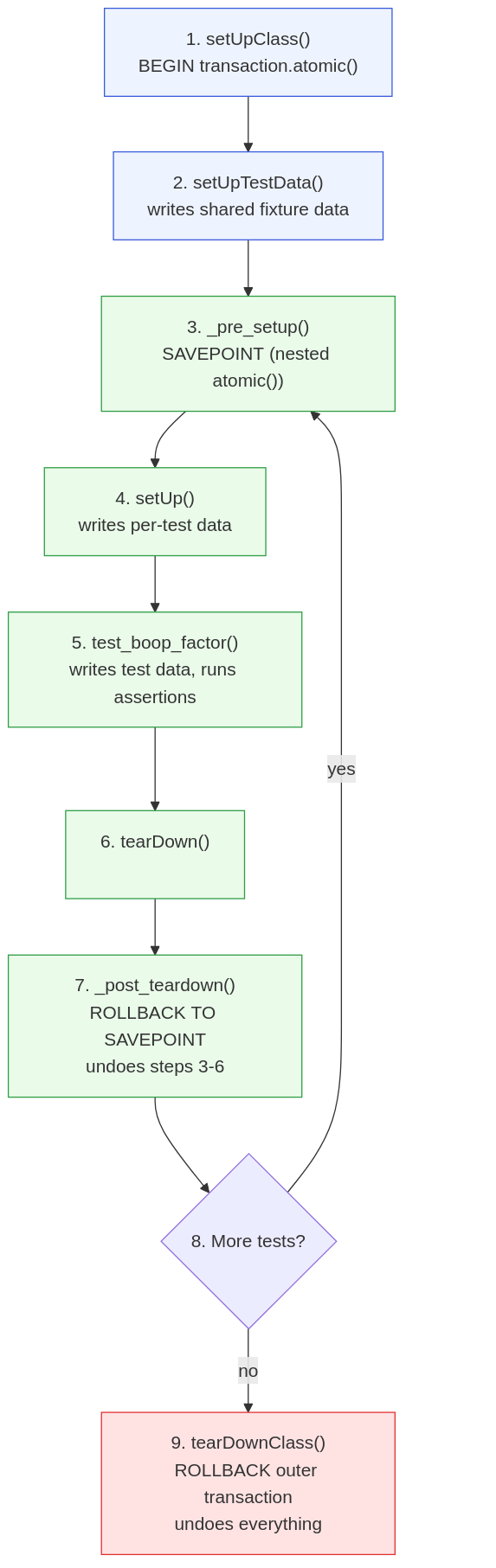
This means that it’s generally safe to modify instances created in setUpTestData because the database is rolled back to a previous savepoint between tests.
What’s more is that you can modify the objects themselves, relatively safely. Django’s TestCase wraps all class attributes set in setUpTestData with the TestData descriptor. The shortest explanation of this is that the original instance is stored on the class itself, then when individual tests try to access it at self.my_attr, it makes a deepcopy of the original and provides the copy. Any changes made to it in the test don’t change the original, which means the next test will get a new copy which avoids leaking state from one test to the next.
This means you’re safe to both modify the model instances created in setUpTestData and any properties on the objects themselves. Provided they support copy.deepcopy().
If you have thoughts, comments, or questions, please let me know. You can set up a meeting with me, or find me on the Fediverse, Django Discord server or use email.
-
Created and destroyed here aren’t 100% accurate. The
TestCasesets up multipletransaction.atomic()blocks, then rolls back to a specific savepoint. ↩ -
Still an incomplete understanding as I’m assuming a physical database and not a memory based one. And one that supports savepoints. So PostgreSQL and SQLite. ↩

Written by Tim Schilling
Django 6.x Steering Council member, maintainer of django-debug-toolbar and django-simple-history, and a professional software engineer since 2009. These days, I mentor developers one-on-one.